A new guided setup, and a fresh look inside the app
 HeyVini team · · 3 min read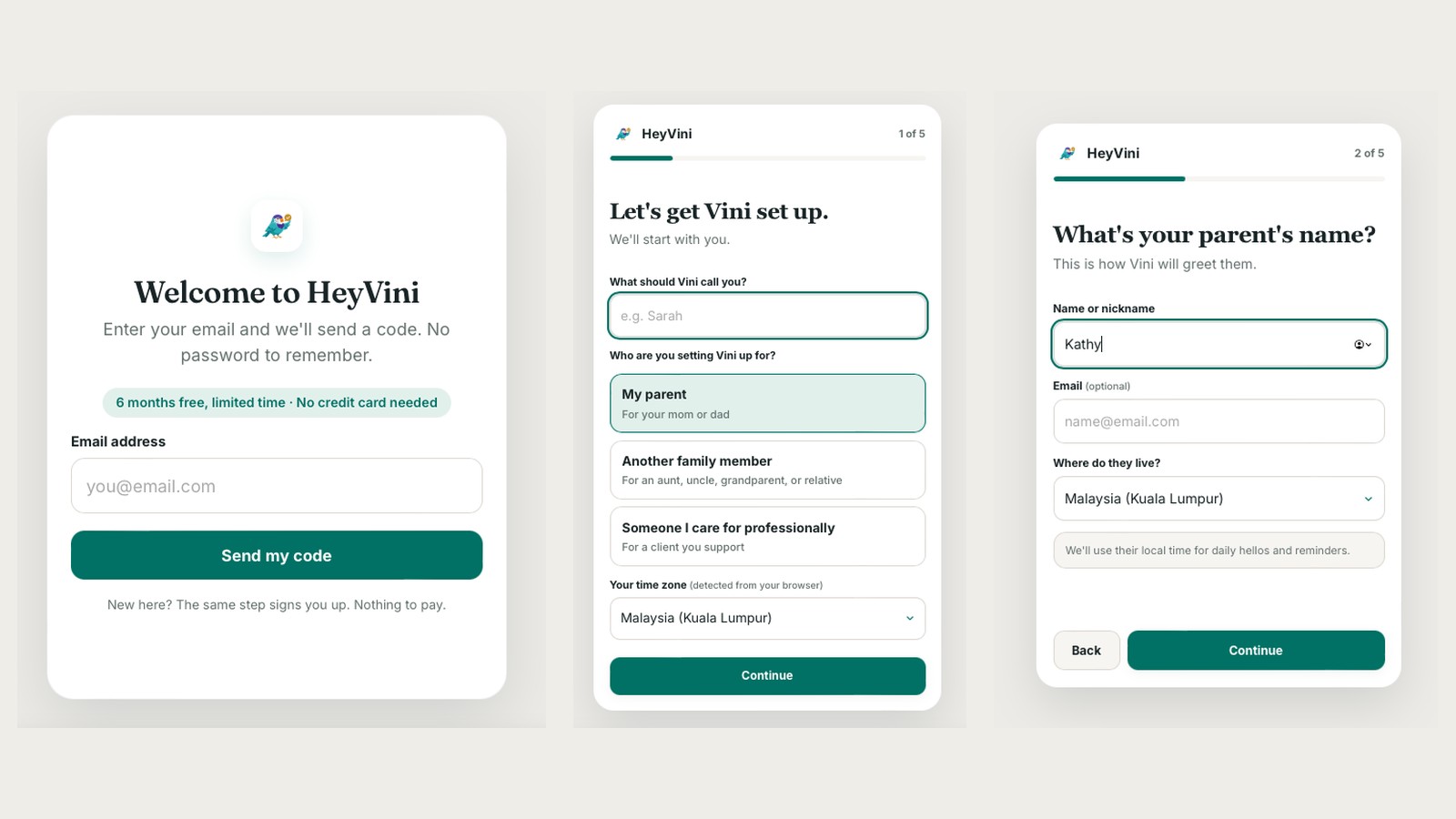
The old setup was one long form. Your name, your parent's name, their number, their time zone, a check-in time, a channel. Reasonable questions, all on one screen, on a phone. It worked. It wasn't kind.
What changed
Setup is now five short screens, one question at a time. Who you're setting Vini up for. Their name and where they live. How Vini should reach them. What time to say hello (9 AM is the default). How Vini should reach you. Nothing is saved until the last step, so an abandoned setup leaves nothing half-made.
- 1You
What Vini should call you, and who you're setting her up for.
- 2Them
Their name and where they live, so hellos and reminders arrive in their time.
- 3How to reach them
WhatsApp by default, Telegram if they prefer it.
- 4The daily hello
8, 9 or 10 AM, or any other time on the hour or half hour.
- 5How to reach you
So a nudge finds you when it matters.
WhatsApp is now the default channel, and the moment setup finishes, Vini introduces herself to your parent on WhatsApp. You don't have to explain who this new contact is.
Inside the app, the pages were renamed to what they actually are and redesigned around a phone screen: Today (how everyone is doing, and what's coming up), Weekly view (daily hellos and important tasks, day by day), Care circle (everyone in one place, tap a person for their details) and Useful contacts. Adding or editing someone now asks the same questions as setup did, so the daily hello is on by default for a parent.
A couple of days later we made setup survive a page refresh (you pick up where you left off), and removing someone became "archive", so their history stays and you can bring them back.
Why
Because the first two minutes decide whether a family gets to the good part. If setup is a form, people fill it in wrong or give up. If it's a conversation, they finish.
What it means for your family
About two minutes from signing up to Vini saying hello to your parent, on the app they already use. And a Today screen that answers the only question you had: is Mom okay?
More product updates

A new website, and 6 months free
A rebuilt hey-vini.com with a page for each thing Vini does, a scroll-through day with five families, a blog for caregivers, a welcome tour after setup, and the Family plan free for 6 months.
10 September 2026 · 2 min read
45 countries, and reminders at half past
Vini now supports the time zones of 45 countries, including India, Sri Lanka, the UAE, Japan and New Zealand, and reminders can land at 5:30, not just 5:00.
27 August 2026 · 2 min readWritten by the HeyVini team. Drawn from what caregivers tell us, checked against caregiving and medical guidance.